<!-- 한반에 셋팅을 하려면 !하고 엔터를 치면 된다 -->
<!DOCTYPE html>
<html lang="en">
<head>
  <meta charset="UTF-8">
  <meta name="viewport" content="width=device-width, initial-scale=1.0">
  <title>Document</title>
</head>
<body>
  <h1>Heading</h1>
  <h2>Heading</h2>
  <p>texttext</p>
  <p>This is <em>emphasis</em></p>
  <p>hit <strong>my name</strong> is</p>
  <!-- ordered list의 약자이다. 정렬된 리스트 -->
  <!-- 정렬이 되지 않은 list는 ul이다 -->
  <ol>
    <li>파이썬</li>
    <li>알고리즘</li>
    <li>웹</li>
  </ol>
</body>
</html>
- Heading & Paragraphs
<h1> </h1>
가장 큰 대주제
마크다운 # 랑 같다
문서의 최상위 제목이라는 뜻
<h2> </h2>
그 다음으로 작은 글자
<h6> </h6>
h1~h6까지 있다.
- Lists
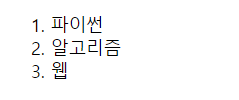
<ol> </ol>
ordered list 정렬된 리스트
<li> </li>
list 그냥 리스트
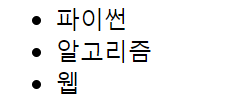
<ul> </ul>
얘는 unordered list이다
- 강조
strong tag / bold체
<p> this is <strong> strong </strong></p>
- 기울임체
em tag / emphasis
<p> this is <em> emphasis </em></p>
'WEB > HTML' 카테고리의 다른 글
| [HTML] 웹에 대한 건 mdn 문서 먼저 보기 (웹에도 표준이 존재하기 때문에) / mdn 자습서 코너 (0) | 2024.03.10 |
|---|---|
| [HTML] 줄 바꿈 <br> (0) | 2024.03.10 |
| [HTML] HTML 코드 한방에 셋팅 / ! + enter (0) | 2024.03.10 |
| [HTML] <p></p>, <a href=""> </a>, <img src="" alt=""> (0) | 2024.03.10 |
| [HTML] HTML 주석 단축키 Ctrl + / (0) | 2024.03.10 |